
RENTAL LED DISPLAY BUYER GUIDE
Rental LED Display Cabinet Planning Checklist
Rental LED display cabinet planning should begin with the venue, screen geometry, installation method, operating workflow and transport plan—not with a cabinet quantity alone. A useful request for quotation explains where the stage rental LED system will be used, how it will be built, what content it must show, how crews will handle it and what support the project expects. Those inputs help a supplier review the complete display system and reduce assumptions before a configuration is proposed.
Rental LED Display Planning: Quick Checklist
- Define the display role, audience and viewing area.
- Confirm indoor or outdoor operating conditions.
- Provide target dimensions, flexible limits and content ratio.
- Identify the support method, access space and handling route.
- Map the signal, control, content and power responsibilities.
- Separate working cabinets from packing, accessories and project spares.
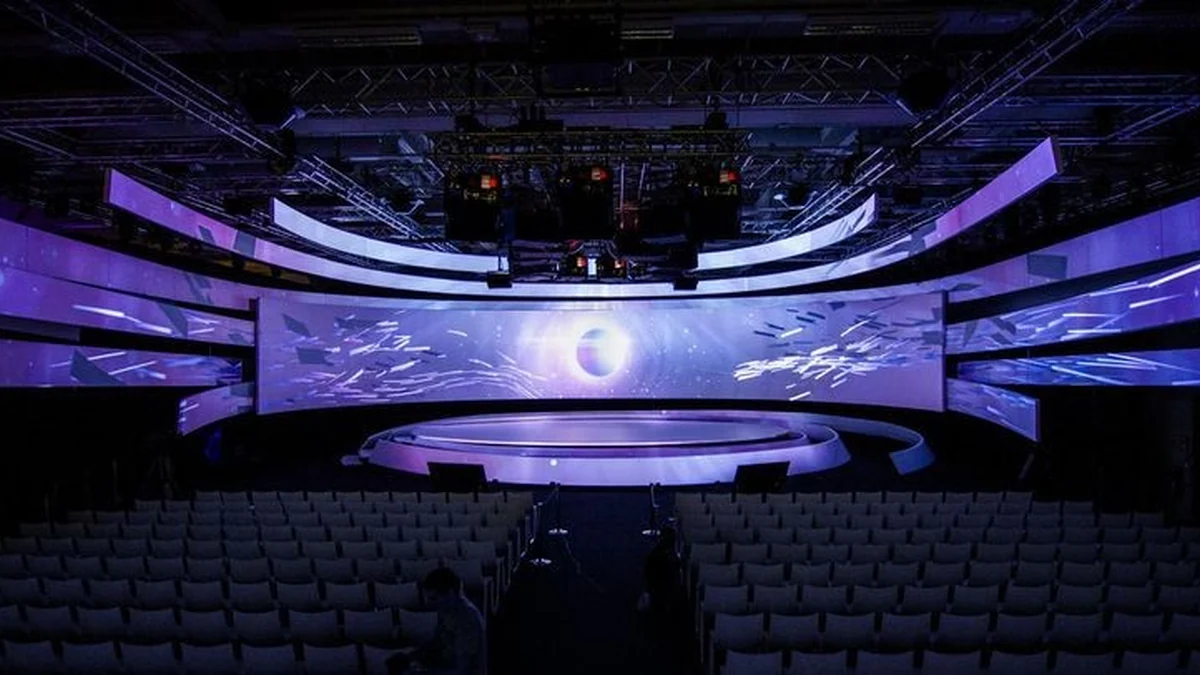
This checklist is written for rental companies, AV engineering teams, production suppliers, system integrators and venue contractors comparing rental LED display systems. It does not replace structural, electrical or rigging review by qualified project professionals. Instead, it identifies the information a buyer should organize before asking a manufacturer to recommend cabinets, controls, accessories, packing and spares.
Why should cabinet planning start before the quotation?
A rental LED screen configuration is a connected system. Cabinets form the visible canvas, but the final working package also depends on mounting hardware, signal distribution, power planning, control equipment, cabling, flight cases, spare parts and the conditions in which crews will assemble and operate the display. If the request contains only a target width and height, the supplier still has to guess many of those conditions.
Early planning also separates requirements that are essential from preferences that can be adjusted. The target image shape may be fixed by a stage design, while exact cabinet quantities may change after the supplier reviews the usable dimensions. A touring team may prioritize repeated assembly and protected transport, while a one-venue production may place more weight on access around the installed screen. Documenting those priorities produces a more useful technical conversation than asking for a generic price per square metre.
What venue and event information should buyers provide?
Describe the audience, viewing area and display role
Start with the job the LED screen must perform. Is it the main stage background, a side screen, a hanging visual element, a scenic strip or part of a multi-screen layout? Explain where the audience will stand or sit, the approximate viewing range, the camera positions if the show will be recorded, and whether the screen will display live video, presentation graphics, sponsor content or designed stage visuals.
The display role affects the questions a supplier must ask. A main image canvas may require a different layout discussion from narrow scenic columns. A screen seen by cameras should be reviewed as part of the complete camera and content workflow. An unusual shape should be communicated with a drawing rather than described only as “creative.” The more clearly the buyer defines the visual task, the easier it is to review cabinet orientation, screen proportions and signal routing.
Identify indoor or outdoor operating conditions
State whether the project is indoors, outdoors or expected to move between different environments. For outdoor work, describe exposure, placement, operating hours and the protective measures planned by the production team. For indoor work, note ceiling height, loading access, stage depth, audience distance and any restrictions on rear service space. Do not assume that every rental cabinet is suitable for every environment simply because it can be assembled in the required shape.
Environmental and site details should be reviewed against the specific proposed product and the signed project documents. Avoid copying a rating from an unrelated model or an old catalog table. The correct approach is to let the supplier match the stated conditions to the product version being quoted.
How do screen geometry and cabinet quantity fit together?
Give the usable image dimensions and content ratio
Provide the desired visible width and height, but also explain which dimensions are flexible. Cabinet formats create a physical grid, so a proposed screen may need a small size adjustment to maintain a complete, repeatable layout. If the content must follow a specific aspect ratio, include that information before the cabinet map is finalized. For a multi-screen stage, label each canvas and show the intended relationship between them.
A simple elevation drawing is often more useful than a paragraph. It can identify the screen edge, stage floor, truss or support position, nearby scenic elements and available working space. When drawings are not final, mark them as preliminary and identify the dimensions that still require site confirmation.
Separate working cabinets from project spares
The working quantity forms the planned display. Spare cabinets, modules, receiving components, cables and other service items support the operating plan. The appropriate spare package is not a universal fixed percentage: it depends on the product, event schedule, travel pattern, service capability and risk plan. Buyers should explain whether the system will tour, how often it will be assembled, where replacement parts will be stored and who will perform on-site diagnosis.
This distinction also improves purchasing records. A cabinet map should show what is required for the screen, while the packing and spare list should show what travels with it. Keeping those lists separate makes receiving, warehouse control and event preparation easier to audit.
| Planning input | What to provide | Why it matters |
|---|---|---|
| Display role | Main wall, side screen, scenic element or multi-screen system | Defines the visual and system task |
| Usable dimensions | Target width, height and flexible limits | Supports a complete cabinet map |
| Content format | Aspect ratio, live video, graphics and playback workflow | Connects the physical canvas to content |
| Installation | Ground-supported, hanging or project-specific arrangement | Guides hardware and access review |
| Transport cycle | Local use, touring, handling frequency and storage | Guides packing and spare discussions |
| Service plan | Available access, crew responsibility and expected support | Clarifies maintenance workflow |
Which installation and handling details affect the package?
Define the support method and access space
Tell the supplier whether the screen is expected to be ground-supported, suspended or integrated into a project-specific scenic structure. Provide the planned support concept and identify the party responsible for structural and rigging approval. A display manufacturer can review compatible cabinet and accessory options, but the finished installation must still follow the project’s engineering, venue and safety requirements.
Access around the display matters as much as the front view. Note whether technicians can work behind the screen, whether the installation blocks rear access, and how failed components would be reached during an event. The proposed product and system layout should be reviewed against that real service path rather than a generic diagram.
Plan LED cabinet handling from truck to stage
LED cabinet handling includes unloading, case movement, staging, assembly, disassembly and return to storage. Describe door sizes, loading routes, lift access, floor conditions and any limits on case movement. For touring work, also identify how the cases will be packed into the transport plan and whether different screen sections need separate labels.
Clear identification reduces confusion during repeated builds. Buyers can request cabinet maps, cable labels, case lists and assembly records as part of the project documentation discussion. The exact document package should be agreed for the order rather than assumed.
How should controls, power and content be discussed?
Map the signal path and operating responsibility
Explain where playback or live production equipment will be located, who provides the source signal, and how the operator expects to control the screen. Identify the number of independent canvases and whether the system must switch among different sources. If the project includes cameras, processors or other equipment supplied by different teams, record the interface responsibility between those teams.
A useful system discussion covers the complete route from content source to displayed image. It should also identify the backup procedure expected by the production team. The final equipment list depends on the chosen configuration, so buyers should request a system diagram tied to the quotation instead of assuming that a familiar controller applies to every screen.
Confirm content before the first build
Physical screen proportions and digital content must agree. Provide sample files or resolution requirements early enough for the content team to prepare the correct canvas. If multiple screens form one show design, explain whether they display independent material or coordinated content. A pre-event content and signal check can reveal mapping or formatting issues before the installation schedule becomes tight.
Power planning must likewise follow the proposed system and site. Share the available supply information with the responsible electrical professional and the display supplier. Final circuits, distribution and protection should be based on the approved project configuration, not on a generic estimate copied from another event.
What should the packing, spares and support plan cover?
A rental system is handled more often than a typical fixed installation, so the handover should cover more than the visible cabinets. Ask for an itemized packing list that distinguishes working equipment, accessories and spares. Confirm how cases are labeled, how cables are grouped and what records will be provided for receiving and future event preparation.
Support expectations should be written down before the order. Identify the buyer’s technical contact, the intended diagnostic process, the information required when reporting a problem and the route for parts or repair. MVP LED’s approved public baseline is a two-year standard warranty, while final coverage, spare responsibilities, transport costs and project-specific terms are defined by the signed quotation and contract. Buyers can review the current LED display warranty and technical support framework before confirming order-specific terms.
How does manufacturing review support a rental project?
Approved MVP LED manufacturing evidence covers SMT, module production and aging, cabinet assembly, system configuration, inspection, warehousing and packing. For a rental project, the relevant point is traceability between the agreed configuration and the equipment prepared for shipment. The order documents, cabinet map, control plan, accessories and packing list should describe the same system.
Buyers can use the LED display quality control process as a starting point for discussing project checks. The exact inspection scope should reflect the quoted product and project requirements. Claims about certification coverage, fixed production capacity or guaranteed project results should not be inferred from a general manufacturing description.
Frequently Asked Questions
What information is most important for a first rental LED quotation?
Provide the display role, venue, indoor or outdoor use, target visible dimensions, content ratio, installation concept, event schedule, destination and expected support. Drawings and site photos are helpful when their status and source are clear.
Should a buyer choose the cabinet quantity before contacting a supplier?
A preliminary quantity can help, but the supplier should review it against cabinet format, final geometry, installation and spares. Keep the visible screen quantity separate from the spare and service package.
Is one rental LED configuration suitable for every stage?
No. Venue conditions, viewing, content, installation, transport, service access and project responsibilities differ. The selected product and accessories should be tied to the stated project requirements.
How should buyers compare two rental LED proposals?
Compare the full scope, not only the cabinet line. Check the cabinet map, controls, accessories, mounting approach, packing, spares, documentation, warranty terms, logistics and exclusions. Ask suppliers to clarify differences in writing.
Prepare a clearer rental LED project brief
A good brief turns a general stage-screen request into a reviewable system. Organize the venue, dimensions, content, installation, handling, controls, power interface, packing, spares and support expectations before final configuration. This gives both buyer and supplier a shared basis for technical review and commercial comparison.
To discuss a current project, send your stage LED project brief to MVP LED. Include available drawings, target dimensions, venue conditions, event schedule and destination so the team can review the requirements without relying on unverified assumptions.
Article Review and Sources
Written by: MVP LED Editorial Team
Reviewed by: TOM, Product Manager at MVP LED
Reviewed on: August 3, 2026
Primary MVP LED sources: Rental LED Display, Quality Control, and Warranty and Services.